TP-Link NVR 32CH Network Video Recorder NO PoE Ports
Couldn't load pickup availability
Order Over $400*
with Tax Invoice
Return & Warranty
Partner With Tech Support
TP-Link VIGI 32CH Network Video Recorder NO PoE Ports
Features:
- 32-Channel Live View and 4K HDMI Video Output
- Up to 16-ch @ 2MP (25fps) / 8-ch @ 4MP (25fps) Decoding Capability
- 16-Channel Synchronous Playback†
- 320 Mbps Incoming Bandwidth and 320 Mbps Outgoing Bandwidth
- 4× SATA Interfaces and 1 Up to 16 TB*
- H.265+ Compression Technology
- HDMI and VGA Simultaneous Output
- Remote Monitoring
- 16-ch@2MP/ 8-ch@4MP Decoding Capacity†: Allows you to enjoy more channels, live view, and playback at the same time.
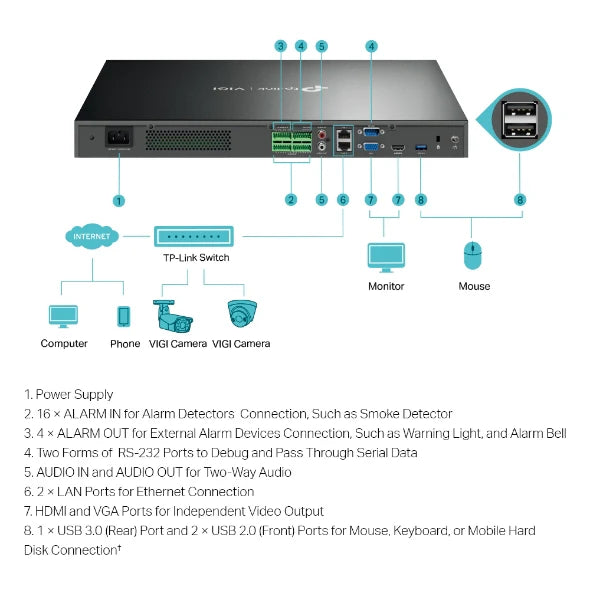
- 1 HDMI and 1 VGA Interface: Supports independent video output.
- H.265+: Without using any extra bandwidth, your camera transmits compressed crystal-clear video to save disk space, ease network loads, and reduce monitoring costs without sacrificing image quality.
- 320 Mbps Incoming and Outgoing Bandwidth: Ensures your NVR manages more cameras with high resolutions.
- Mass Storage: Supports 4× SATA, up to 10 TB each.
- 16-Channel Simultaneous Playback: Replay the feed from up to 16 cameras at the same time, increase replay speed, and find events in the video schedule to easily review footage.
- Dual Ethernet Ports Design: Supports three network modes, including muti-address mode, network fault-tolerance and load balance.
- Plug & Play: Allows new and unused VIGI IP Cameras to be added automatically to the new NVR and activated instantly, making installation faster than ever before.
- Remote Monitoring: The dedicated VIGI app, web UI, and VIGI Security Manager enable remote monitoring, providing ease and convenience.
- Rack Mounting: Space-saving and easy installation.
- ONVIF Ensures Compatibility: Easily adds IPCs from VIGI and other brands to establish a powerful and varied network thanks to barrier-free compatibility.
Download
- Manual
-
- VIGI App_UG
- VIGI NVR4032H Multi-model_Installation Guide
- VIGI Wired NVR_Installation Guide
- VIGI NVR(EU2_16 Languages)_Installation Guide
- VIGI NVR_User Guide
- VIGI NVR_Authentication
- VIGI NVR4032H(UN)_V1_Installation Guide_Asia-Pacific
- VIGI NVR(EU1_Asia-Pacific_Middle-East-Africa_America_18 Languages)_Installation Guide
- VIGI NVR(EU2_South America_19 Languages)_Installation Guide
- VIGI NVR4032H_V1_Installation Guide(English)
VIGI Security Manager
|
VIGI Security Manager_setup_1.6.96 |
Download | |
|---|---|---|
| Published Date: 2024-07-15 | Language: Multi-language | File Size: 92.37 MB |
|
Operating System: Windows
|
||
|
1. Add support for 2FA. |
||
|
VIGI Security Manager_V1.6.85 |
Download | |
|---|---|---|
| Published Date: 2024-06-20 | Language: Multi-language | File Size: 91.38 MB |
|
Operating System: Windows 7/10/11/Server 2008
|
||

At CCTV Masters, we strive to dispatch your order as quickly as possible while ensuring your products arrive safely.
Free Shipping
We offer free standard shipping on eligible orders within Australia:
| State | Free Shipping | Shipping Fee (Orders Below Threshold) |
|---|---|---|
| NSW | Orders over $400 | $20 per order |
| ACT, QLD & VIC | Orders over $700 | $40 per order |
| TAS, SA, WA & NT | Orders over $800 | $50 per order |
Please Note:
-
Bulky, oversized or heavy items may incur additional freight charges. These charges will be calculated and displayed during checkout.
-
Free shipping applies only to online orders delivered within Australia.
Order Processing & Dispatch
-
Orders placed before 11:00 AM (Sydney time) on business days are usually packed and dispatched the same day.
-
Orders received after 11:00 AM, on weekends or public holidays, will be processed on the next business day.
-
Most in-stock orders are dispatched within 24 business hours.
If an item is temporarily out of stock, we will contact you with an estimated dispatch date.
Delivery Time
Delivery times vary depending on your location and the selected courier service.
Estimated delivery times:
-
Major metropolitan areas: 1–3 business days
-
Regional and rural areas: 2–5 business days
-
Remote locations: Additional delivery time may apply
Please note these are estimated delivery times only and may be affected by weather, peak periods, public holidays or courier delays.
Order Tracking
Once your order has been dispatched, you will receive a shipping confirmation email containing your tracking number.
Tracking information is generally emailed around 11:00 PM (Sydney time) on the day your order is dispatched.
We ship using trusted Australian carriers including:
-
Australia Post
-
StarTrack
-
Aramex
Missed Deliveries
If no one is available to receive your parcel:
-
The courier may leave the parcel in a safe location if it is considered secure.
-
If it is not safe to leave the parcel, or a signature is required, a collection card or notification will be provided and your parcel will be taken to the nearest collection point or depot.
Delivery Delays
If your order has not arrived within 4 business days after dispatch, please contact us with:
-
Your full name
-
Your order number
Our team will investigate the shipment and assist you as quickly as possible.
Incorrect Shipping Information
Please ensure your shipping address is correct before completing your order.
If an incorrect address is supplied and the parcel is returned to us, additional shipping charges may apply to resend the order.
Damaged or Lost Parcels
If your parcel arrives damaged or appears to be lost in transit, please contact us as soon as possible.
We will work directly with the courier to investigate and resolve the issue.
Contact Us
If you have any questions regarding shipping or your order, please contact us:
CCTV Masters P/L
173 Chapel Rd South, Bankstown NSW 2200
Phone: (02) 8106 0888
Email: sales@cctvmasters.com.au
Business Hours:
Monday – Friday: 9:30 AM – 5:30 PM
Satuaday/Sunday: Closed
VIGI Security Manager
|
VIGI Security Manager_setup_1.6.96 |
Download | |
|---|---|---|
| Published Date: 2024-07-15 | Language: Multi-language | File Size: 92.37 MB |
|
Operating System: Windows
|
||
|
1. Add support for 2FA. |
||
|
VIGI Security Manager_V1.6.85 |
Download | |
|---|---|---|
| Published Date: 2024-06-20 | Language: Multi-language | File Size: 91.38 MB |
|
Operating System: Windows 7/10/11/Server 2008
|
||
VIGI Config Tool
|
VIGI Config Tool_setup_1.1.10_x64 |
Download | |
|---|---|---|
| Published Date: 2024-08-21 | Language: English | File Size: 145.26 MB |
|
Operating System: Windows 7/8/8.1/10/11
|
||
|
1. Fixed some minor bugs. |
||
|
VIGI Config Tool_setup_1.1.10_x86 |
Download | |
|---|---|---|
| Published Date: 2024-08-21 | Language: English | File Size: 138.04 MB |
|
Operating System: Windows 7/8/8.1/10/11
|
||
|
1. Fixed some minor bugs. |
||
|
VIGI Config Tool_setup_1.1.5_x64 |
Download | |
|---|---|---|
| Published Date: 2024-07-15 | Language: English | File Size: 145.27 MB |
|
Operating System: Windows 7/8/8.1/10/11
|
||
|
Add support for 2FA. |
||
|
VIGI Config Tool_setup_1.1.5_x86 |
Download | |
|---|---|---|
| Published Date: 2024-07-15 | Language: English | File Size: 138.01 MB |
|
Operating System: Windows 7/8/8.1/10/11
|
||
|
Add support for 2FA. |
||
|
VIGI Config Tool_V1.1.4_32bits |
Download | |
|---|---|---|
| Published Date: 2024-06-19 | Language: English | File Size: 137.80 MB |
|
Operating System: Windows 7/8/8.1/10/11
|
||
|
1. Updates the Open Source Software Statement. |
||
|
VIGI Config Tool_V1.1.4_64bits |
Download | |
|---|---|---|
| Published Date: 2024-06-19 | Language: English | File Size: 145.06 MB |
|
Operating System: Windows 7/8/8.1/10/11
|
||